Royal Holloway, University of London, has partnered with Enroly to offer CAS Shield, providing guidance and support for Applicants and Agents at every stage of the CAS issuance and visa application journey.
CAS Shield is an applicant’s central portal for managing CAS-related requirements and enquiries, and processing.
Through the platform, applicants can communicate with the Admissions team before, during, and after a CAS has been issued, provide supporting documents, and receive support with credibility and financial assessments if required.
Before being issued a CAS letter, applicants must complete all required tasks listed in their CAS Shield portal. Steps on how to do this are outlined below.
During the summer period, CAS and visa processing times may be longer due to increased demand. Please complete these steps as soon as possible to help ensure a smooth and timely CAS issuance and visa application process.
What to expect
CAS Shield Invitation
How to obtain an Enroly CAS Shield link
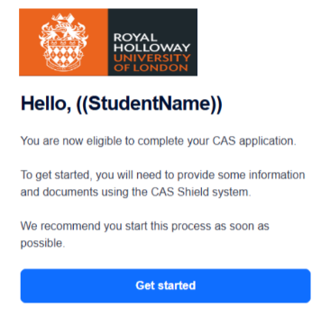
Once applicants have accepted their unconditional offer, they will receive a secure login link from CAS Shield to "Get Started" with their CAS application. This will be sent to the email address used in the application form.
We recommend that applicants log in as soon as possible to enable Admissions to begin the CAS issuance process.
Here's what applicants will see in their email inbox:
Step by Step Guide
How to complete CAS Shield to recieve your CAS
CAS Shield will ask applicants to complete a series of questions and tasks to confirm personal and travel information, academic and financial documents, and submit a pre-CAS interview and financial documents, if required*.
A step-by-step guide is below:
Step 1: Applicants should log in to their CAS Shield portal via the link sent to the email address used in the application (this will be sent once applicants have accepted their unconditional offer).
Step 2: Applicants should then complete the task section of CAS Shield:
- CAS Checklist
- Info Check
- General Docs
- Financial Docs- No need to upload documents
- Questionnaire
*Step 3: Some applicants may be required to complete a pre-CAS credibility interview. This applies to select domiciles. If applicants are required to complete one, they will be invited to complete a PCI, and a new task, "Interview", will appear beneath the "Questionnaire" tab on the portal. Don't worry if the option doesn’t appear right away, as invites to the PCI can take around 24 hours.
*Step 4: If an applicant is required to complete a pre-CAS interview and passes, they will then be required to upload evidence of the Financial Documents declared to their CAS Shield portal, so RHUL can assess if they possess the required funds for a visa application.
Step 5: Once completed and all required steps are passed, provided the applicant also meets the University’s eligibility requirements for Student visa sponsorship, Admissions will issue the CAS.
Step 6: After receiving a CAS from Royal Holloway Admissions, applicants can begin preparing their visa application here.
Step 7: It is asked that applicants keep the University updated on their visa outcome, accommodation status, and travel plans through CAS Shield, so we know how they're getting on, ahead of arrival.
If an applicant receives a visa refusal, applicants are asked to follow the instructions found at the bottom of their CAS letter immediately and update their CAS Shield portal, indicating they have a visa refusal.
If you have any questions along the way, please use the Live Chat function in CAS Shield by clicking the blue chat icon, or email applicants@rhul.ac.uk
StudyGroup Applicants
Guide for Applicants/Agents Applying Via StudyGroup
Applicants and Agents who have applied to Royal Holloway, University of London via StudyGroup will still be invited to Enroly CAS Shield before a CAS letter is issued by StudyGroup. RHUL does not issue CAS letters to applicants who have applied via StudyGroup.
Applicants must complete all tasks in the portal before StudyGroup can issue the CAS letter.
To gain access to CAS Shield, applicants must:
- Have an Unconditional offer
- Have paid the required deposit.
Applicants can check the deposit requirements for their domicile with their Agent, or at Admissions@studygroup.com
Once the above requirements have been met, applicants will receive an email to set up a CAS Shield account via the email address used in the application form. Please ensure applicants have access to this email address to log into CAS Shield.
How to complete CAS Shield:
Step 1: Log in to the CAS Shield portal via the link sent to the email address used in the application.
Step 2: Complete the task section of CAS Shield:
- CAS Checklist
- Info Check
- General Docs
- Financial Docs- No need to upload documents
- Questionnaire
*Step 3: Some applicants may be required to complete a pre-CAS credibility interview. This applies to select domiciles. If applicants are required to complete one, they will be invited to complete a PCI, and a new task, "Interview", will appear beneath the "Questionnaire" tab on the portal. Don't worry if the option doesn’t appear right away, as invites to the PCI can take around 24 hours.
*Step 4: If an applicant is required to complete a pre-CAS interview and passes, they will then be required to upload evidence of the Financial Documents declared to their CAS Shield portal, so RHUL can assess if they possess the required funds for a visa application.
Step 5: Once completed and all required steps are passed, provided the applicant also meets the University’s eligibility requirements for Student visa sponsorship, StudyGroup Admissions will issue the CAS.
Step 6: After receiving the CAS letter from StudyGroup, applicants can begin preparing their visa application here.
Step 7: It is asked that applicants keep the University updated on their visa outcome, accommodation status, and travel plans through CAS Shield, so we know how they're getting on, ahead of arrival.
If an applicant receives a visa refusal, applicants are asked to follow the instructions found at the bottom of their CAS letter immediately and update their CAS Shield portal, indicating they have a visa refusal.
If you have any questions along the way, please use the Live Chat function in CAS Shield by clicking the blue chat icon, or email admissions@studygroup.com
Visiting & Study Abroad Applicants
FAQs and things to note
For applicants coming to Royal Holloway for Term 1 only, they will not need a CAS and will not be sent a link to complete CAS Shield. More information on the Term 1 only Study can be found here.
Applicants coming to Royal Holloway for less than six months for Term 1 (Autumn) only or Terms 2&3 (Spring) only will not require a CAS and will not be sent a link to complete CAS Shield. Applicants will be able to enter the UK using a Visitor visa or Electronic Travel Authorisation (ETA). Further information can be found using this link: Visitor visas and Electronic Travel Authorisations
Applicants coming to Royal Holloway for the full academic year will require a CAS and will be sent a link to complete CAS Shield. Please follow the corresponding guidance for CAS Shield in line with the type of application you have.
Full Year International Exchange and European Exchange
Applicants from partner universities are not required to pay any tuition fee or deposit
- Info Check- When completing the Source of Funds and Calculator section, the course fee deposit is not required, but do add any accommodation deposit paid. Include details of how you will be supported financially whilst studying, for example, a scholarship, a family bank account, or your own bank account.
- Financial Documents- There is no requirement to upload any documents in this field. Please be aware that any information you have listed may be spot checked during the visa application process. Be sure to tick the "acknowledge" tick icon in this section to confirm the information is correct.
- Questionnaire- Please complete the living expenses details, including weekly accommodation and general living costs.
Study Abroad students
Students will need to pay the tuition fee deposit of £3000 and the full stated tuition fee
- Info Check- When completing the Source of Funds and Calculator section, please add the course fee deposit of £3000, as well as any accommodation deposit paid. Include details of how the applicant will be supported financially whilst studying, for example, a scholarship, a family bank account, or your own bank account.
- Course fees- Please check that the tuition fee matches the amount in the offer letter
- Financial Documents- There is no requirement to upload any documents in this field. Please be aware that any information you have listed may be spot checked during the visa application process. Be sure to tick the "acknowledge" tick icon in this section to confirm the information is correct.
- Questionnaire – Please complete the living expenses details, including weekly accommodation and general living costs.
Note for all Visiting applicants above:
The only documents visiting applicants will need to upload to the CAS Shield portal are:
- Original and officially translated academic transcripts
- English language document
- Passport
Please check your CAS Shield portal regularly, as we will use the message function to communicate about the CAS process. The chat box can be found in the bottom right-hand corner and can be accessed by clicking the chat bubble icon.